License policy
Enforce license policy before a package is downloaded
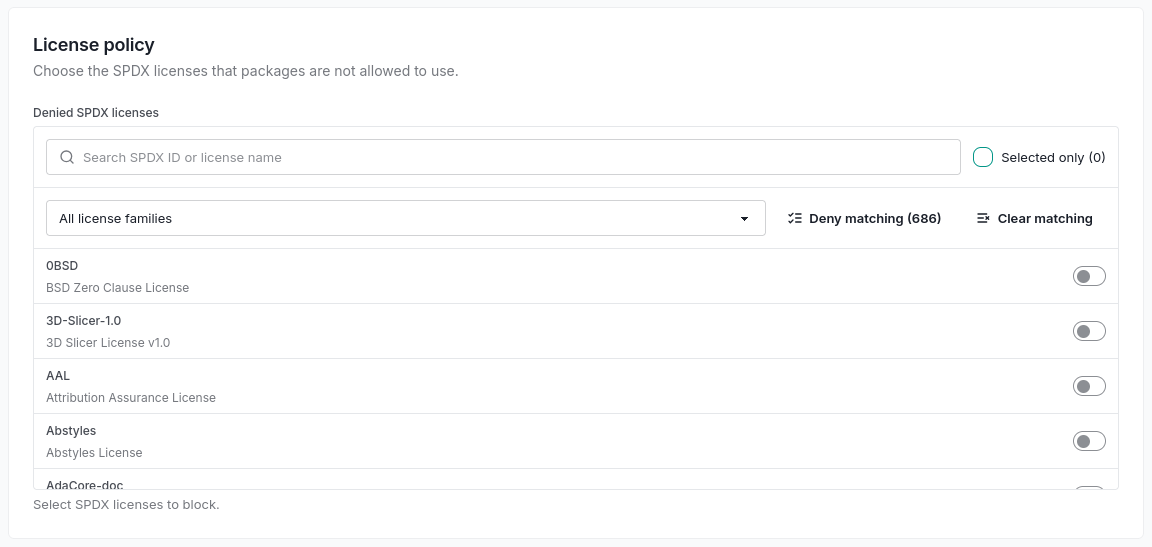
Turn your license policy into an install-time control. Deny SPDX identifiers per workspace, evaluate the full license expression, and follow license changes across tracked releases.
Make license review an enforceable policy
A report tells you what has already entered the inventory. ShieldedStack also evaluates license evidence when a package is requested through the proxy. Each workspace chooses the SPDX identifiers it denies, alongside its vulnerability and release-age requirements.
A known denied license blocks in either running mode unless an explicit allow rule admits the package. A vulnerability exception accepts a particular advisory; it does not exempt the package from license policy.
Evaluate the expression, not just one identifier
Dual licensing matters. If your policy denies GPL-3.0-only and permits MIT, these two declarations have different outcomes:
- MIT OR GPL-3.0-only
- License policy permits the expression because an allowed alternative exists. Other package checks still apply.
- MIT AND GPL-3.0-only
- License policy denies the expression because it requires a denied license.
Unparseable or unresolved declarations remain missing evidence. Verify-Then-Trust blocks pending verification; Trust-Then-Verify can admit the request while collection runs. A missing declaration is not proof of a permitted license.
Notice when a tracked package changes license
When a release first reports its license, ShieldedStack compares it with the nearest earlier tracked version. A change can raise an alert to workspaces using the package, including a move from a permissive license to a more restrictive one.
The comparison uses versions already tracked; it does not fetch every historical release to fill gaps. Route license alerts through your configured notification channels for review.
Keep the policy and its evidence on-premises
Record changes to denied licenses in the workspace audit log, inspect decisions attributed to license policy, and export policy changes for review. Your deployment holds the policy and records; package license evidence comes from the configured collection sources.
Read the policy and enforcement guide →Explore related capabilities
Test it on your infrastructure
Use the 30-day on-premises trial to validate your package managers, policies, and operations. Prefer a first look? The separate 7-day hosted Portal evaluation uses synthetic package activity.